Geometry Dash
A rhythm platform game about jumping, flying, and learning obstacle patterns one clean attempt at a time.
Play Geometry Dash onlineLoading: 0%
Syncing rhythm...
Geometry Dash turns one simple jump button into a fast test of rhythm, memory, and nerve. Play Geometry Dash online, learn the timing, dodge spikes and portals, and restart instantly whenever a beat catches you out.
A rhythm platform game about jumping, flying, and learning obstacle patterns one clean attempt at a time.
Play Geometry Dash online
Race polygon tracks, test your steering, and enjoy instant browser racing with no download required.
Play Polytrack freeGeometry Dash sits at the intersection of rhythm games, browser games, skill games, and fast reaction challenges.
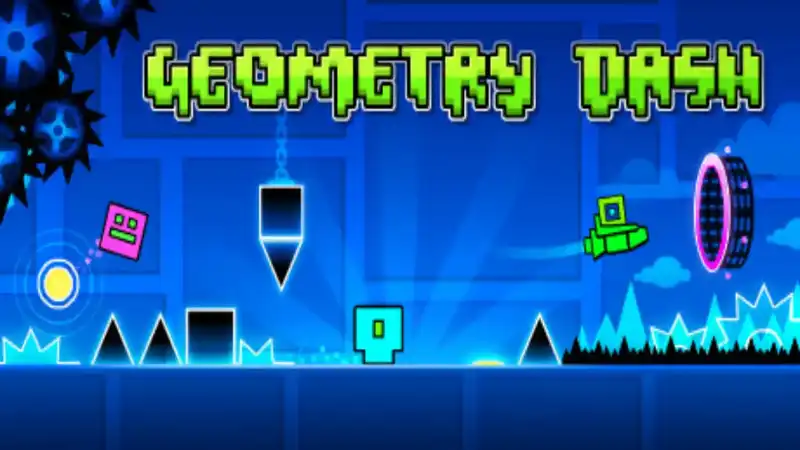
Geometry Dash is a rhythm-based platform game built around a simple idea: your cube moves forward automatically, and you decide exactly when it jumps. That single input is enough to create a surprisingly deep challenge because every spike, block, jump pad, orb, portal, and flying section is placed to test your timing.
The appeal comes from how quickly the game teaches through repetition. A missed jump is not a long failure screen; it is a quick restart and another chance to read the pattern better. Each attempt makes the level feel less random. You start by reacting to what is on screen, then gradually memorize the rhythm until a difficult sequence feels almost musical.
Players search for geometry dash online because the browser version makes that loop immediate. You do not need to install a large file or set up an account before testing a level. Open the page, focus on the beat, and practice until your fingers understand when to tap, hold, and release.
Geometry Dash is also known for its bold visual language. Levels use sharp geometric shapes, bright color changes, portals that alter gravity or form, and music that gives each section a distinct pace. The result is a game that looks simple in a screenshot but feels alive when the beat starts pushing you forward.
If you enjoy games where success depends on practice rather than luck, Geometry Dash is a natural fit. It rewards patience, pattern recognition, and calm timing. The controls are easy to learn, but the harder sections ask for steady focus and a willingness to restart until the route becomes familiar.
Learning how to play Geometry Dash starts with one rule: stay in rhythm. Your character moves on its own, so your job is to press at the exact moment needed to clear hazards and survive the next pattern.
Geometry Dash levels are not only flat jump courses. Portals can change your gravity, speed, size, or movement form. Jump pads launch you automatically when you touch them, while orbs need a press at the right moment. When a new symbol appears, treat the next attempt as information gathering. Notice what changed, then adjust the timing.
The soundtrack is more than background energy. Listen for the beat, because level patterns often match jumps, portals, and sudden speed changes.
Spikes, blocks, saws, and gaps become easier once you know where they are. Repetition turns surprise into planned movement.
Fast resets keep the pace moving. A failed jump is simply the beginning of the next attempt, which makes practice efficient.
Ship, ball, wave, and other sections ask for different timing. Learn each form separately instead of treating every part like a cube jump.
Progress comes from calm repetition. Short practice bursts are often better than forcing one tired run after another.
The geometry dash browser game format lets you start quickly on desktop, Chromebook, tablet, or phone.
Do not judge your skill by one full-level run. Focus on the first obstacle that stops you, solve that pattern, then move the goal a little farther. This keeps improvement visible.
New players often jump early because they see a spike and panic. Wait until the cube is closer to the edge, then tap with intention. Late, clean jumps usually beat nervous taps.
The best timing comes from combining visual landmarks with music cues. If you mute the game, watch block edges and portal positions more carefully.
Flying sections reward gentle corrections. Holding too long sends you into the ceiling, while overcorrecting downward causes a crash. Think in small taps, not dramatic moves.
Geometry Dash is designed around repeat attempts. Restarting is not a sign that you are playing badly; it is the main way the game teaches timing and memory.
If you keep failing an easy jump, step away for a minute. Rhythm games punish tense hands, and a short break often fixes more than another rushed attempt.
The biggest reason to play Geometry Dash online is speed. The game is built around short attempts and quick retries, so it feels natural to open it in a browser and begin immediately. When you want a quick challenge between tasks, a browser page is easier than managing downloads or updates.
A free browser version also makes it simple to practice on different devices. You can use a keyboard on desktop, tap on a touch screen, or play on a Chromebook when you want a compact skill challenge. The core idea stays the same: one input, one rhythm, and a level that asks you to improve one attempt at a time.
Players sometimes search for geometry dash unblocked because they want frictionless access from school, work, or shared computers. This page focuses on the playable game detail page rather than a hidden embed, so the game page can be indexed, linked, and revisited directly.
Browser play is also beginner friendly. If you are curious about geometry dash free gameplay, you can learn the controls and decide whether the rhythm platform style suits you before exploring other versions.
The Geometry Dash name covers several related rhythm platform experiences. They share the same core language of jumps, portals, music timing, and short attempts, but each version can emphasize a different pace or set of levels.
Geometry Dash World is often searched by players who want a compact version with short levels and a familiar rhythm challenge. It is a good phrase to know because many players use it when looking for similar Geometry Dash style gameplay online.
Geometry Dash online pages focus on instant browser play. The advantage is convenience: no download, quick loading, and a game loop that fits naturally into short sessions.
If you like precision challenges but want a different feel, try Polytrack. It swaps rhythm jumps for racing lines, track control, and speed management while keeping the same instant-play browser spirit.
These quick answers cover the most common questions about Geometry Dash controls, browser play, practice, and beginner strategy.
Yes. You can play Geometry Dash online for free on this page without installing files or creating an account. The game runs inside the browser iframe above.
The main Geometry Dash controls are mouse click, space bar, up arrow, or screen tap. Tap to jump, press or tap on orbs, and hold in flying sections to rise.
Yes. Geometry Dash is a rhythm-based platform game. The music does not play the level for you, but it helps you anticipate jumps, speed changes, and pattern shifts.
Practice small sections, listen for music cues, memorize the obstacle order, and avoid early panic jumps. The best Geometry Dash tips are simple: stay calm, repeat patterns, and rest when your timing gets messy.
Geometry Dash World is a related Geometry Dash experience that many players search for when they want short rhythm platform levels and similar jump timing. This page focuses on playing Geometry Dash online in the browser.
Refresh the page, check your connection, disable strict ad or script blockers, and try a modern browser such as Chrome, Edge, Firefox, or Safari. If the retry screen appears, use the retry button above the game area.
Ready for another attempt? Return to Geometry Dash and put the timing tips into practice.