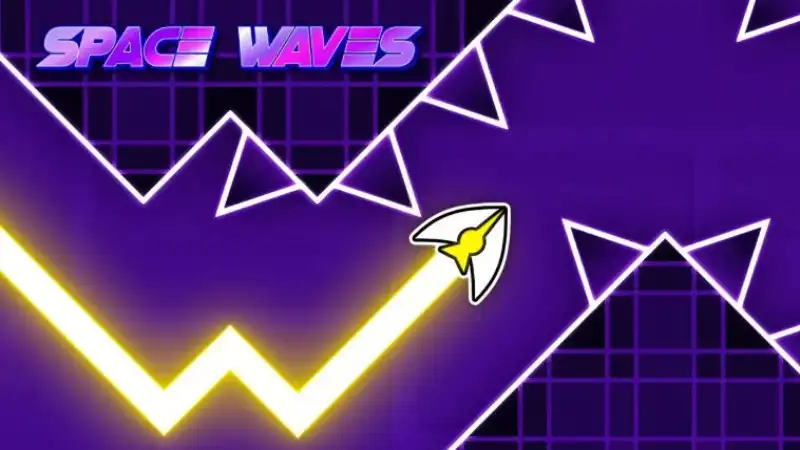
Space Waves
Play Space Waves online and test your reflexes in a fast arcade space game with tight obstacle tunnels.
Play Space Waves onlineLoading: 0%
Charging the neon tunnel...
Space Waves is a fast arcade space game about rhythm, restraint, and clean reactions. Guide a glowing arrow through narrow tunnels, dodge geometric hazards, and keep your wave movement under control as each corridor tries to pull you into the next mistake. Play Space Waves online above with no download and use this guide to understand the controls, timing, obstacles, and practical tips before your next run.
Play Space Waves online and test your reflexes in a fast arcade space game with tight obstacle tunnels.
Play Space Waves online
Race polygon tracks, build custom routes, and enjoy instant browser racing with no download required.
Play Polytrack free
Jump through rhythm levels, avoid spikes, and practice precise timing in a fast browser platform game.
Play Geometry Dash
Explore global locations, read map clues, and guess where you are in a relaxed geography challenge.
Play WorldGuessrSpace Waves fits naturally beside browser arcade games, action games, skill games, space games, obstacle games, and quick reaction challenges built for short sessions.
Space Waves is an arcade obstacle game where a small arrow travels through neon space corridors. The idea is easy to understand: rise, fall, avoid contact, and survive long enough to reach a better distance or clear the next section. The challenge comes from the way the movement behaves. Your arrow does not simply move in straight platformer steps. It rides a wave path, so each press and release changes the angle of travel.
That wave movement makes Space Waves feel simple in the first few seconds and demanding once the tunnel tightens. Walls, spikes, rotating gears, angled corridors, and narrow gates force you to plan a second ahead. Strong players are not just fast; they are calm. They use small corrections, read the tunnel shape early, and avoid the panic taps that send the arrow into a wall.
If you like browser games that can be played instantly but still reward practice, the Space Waves game fits that break-time rhythm well. A run can be quick, but every attempt teaches something about timing, line choice, and obstacle spacing. The game is lightweight enough for casual play, yet precise enough for players who enjoy chasing a cleaner route.
This Space Waves online page is built as a playable game page first. The iframe is placed at the top so you can start right away, while the sections below explain how to play Space Waves, what the controls do, which obstacles matter, and how to build more reliable reflexes over time.
The core rule is simple: guide the arrow through the path without touching obstacles. In practice, Space Waves is about managing height and angle. Pressing makes the arrow climb along a diagonal line. Releasing lets it fall along the opposite diagonal. The longer you hold, the steeper the climb becomes, so most successful runs use short pulses instead of long holds.
When you are new, do not try to fly near the center of every gap perfectly. Instead, choose a calm middle lane and keep your inputs light. Tap to correct, release to settle, and let the arrow travel in shallow zigzags. A shallow path gives you more time to respond than a steep path, especially when an obstacle appears immediately after a turn.
Space Waves controls feel like a continuous zigzag. You are always shaping the next diagonal line, so smooth timing matters more than sudden overcorrections.
Obstacles appear quickly and often leave only a narrow safe route. Good runs depend on reacting early while keeping your hand relaxed.
The bright arcade look makes the tunnels easy to scan, while the pace keeps every run tense, clean, and easy to restart.
The difficulty curve rewards practice. Easier routes teach the movement, while harder paths demand sharper control and better anticipation.
Most Space Waves obstacles test one of three skills: staying centered, changing height quickly, or delaying a press until the path opens. Straight walls are the first lesson because they punish steep movement. Spikes and jagged shapes punish late reactions. Rotating hazards and angled corridors punish players who stare only at the arrow instead of the next opening.
Timing improves when you stop thinking of the control as a jump. Space Waves is closer to steering a line. If your arrow is low and the next gap is high, tap early enough to rise gently. If you are already high, release before the tunnel forces you down. Each input should prepare the next safe line, not just rescue the current one.
The hardest sections often come after an easy stretch. A wide tunnel encourages a loose rhythm, then a sudden tight gate asks for precise movement. Use wide sections to reset your line near the center. Do not drift to the ceiling or floor unless the next pattern clearly requires it.
On mobile, the same timing applies, but your finger can block part of the screen if you play in portrait mode. Try holding lower on the screen, using landscape orientation, or returning to fullscreen when the action feels crowded. The goal is to see the next two decisions before you make the first one.
A beginner should focus on consistency before speed. The game already moves quickly; your job is to remove unnecessary motion. Hold only long enough to change direction, then release before the arrow climbs too far. If you crash repeatedly in the same place, slow your input rhythm in the section before it. Most mistakes are created one obstacle earlier than they appear.
Easier Space Waves levels are useful for building muscle memory, while difficult paths are better for reading obstacle patterns. If a hard route feels impossible, return to a simpler run and practice shallow movement for a minute. Then come back with a cleaner rhythm. This back-and-forth builds control faster than repeating the same crash point without adjustment.
Space Waves online loads directly in the page, so you can start a run without installing software or managing a separate game client.
Each attempt is quick enough for a break but skill-based enough to make a better run feel earned.
Better timing is easy to feel. You crash less, recover sooner, and start reading patterns before they reach the arrow.
Many players search for Space Waves unblocked because they want a lightweight game that opens quickly in a browser. This page keeps the experience simple: the Space Waves game online appears in the iframe above, and the guide below gives you practical help without sending you through extra steps.
Network access can vary by school, workplace, device settings, browser security, or local filters. If the game does not load, use the retry button, refresh the page, try a modern browser, or switch networks when appropriate. The page itself is set to index and follow for search engines, while the playable iframe remains part of this game detail page.
For the smoothest browser play, close heavy tabs, use fullscreen when available, and keep the page at a comfortable zoom level. Space Waves depends on reaction timing, so input delay or a crowded screen can make the game feel harder than it really is.
The best setup is the one that helps you see the tunnel early. Desktop players often prefer keyboard or mouse control. Mobile players may prefer landscape mode because it gives more horizontal space to prepare for the next obstacle pattern.
If you enjoy the Space Waves arcade game, you may also like action games, obstacle games, rhythm platformers, endless runner challenges, and browser games that reward quick pattern reading. The common thread is simple control with a high skill ceiling: one input, many possible mistakes, and a better run always within reach.
On Polytrack.my, try Polytrack when you want racing lines and track building, Geometry Dash when you want rhythm timing and jumps, or UNO Online when you want a quick card game between arcade runs.
Space Waves is especially good for players who like games that teach through repetition. You do not need a long tutorial; the first crash explains the rule, and the next run gives you a new chance to improve. That makes it useful for quick sessions, daily reflex practice, or relaxed competition with friends over who can survive a tougher tunnel.
Player feedback around this style of game usually focuses on the same things: fair restarts, readable obstacles, and the satisfying feeling of finally clearing a section that looked impossible five minutes earlier. Space Waves works because it makes that improvement visible run by run.
These answers cover free play, controls, browser access, mobile support, beginner tips, and what to do if the Space Waves iframe does not load correctly.
Yes. You can play Space Waves online for free on this page in a modern browser. The game loads inside the iframe above, so there is no separate download from Polytrack.my.
Hold the control to move upward, release to move downward, and guide the arrow through each tunnel without touching walls, spikes, gears, or other obstacles. Small inputs are usually safer than long holds.
The usual Space Waves controls are mouse or touch hold to rise and release to fall. Depending on the embed, keyboard controls such as Space, W, or the up arrow may also work.
This page is designed for direct browser play, which is why many players describe the experience as Space Waves unblocked. Access still depends on your network, device, and browser settings.
Space Waves can run in mobile browsers with touch controls. For better visibility, try fullscreen mode, landscape orientation, and a browser zoom level that keeps the full game area inside the screen.
Use short taps, look ahead, stay near the center of the safe tunnel, and avoid panic corrections. The best Space Waves tips all come back to controlled movement and early reading.
Refresh the page, use the retry button, check your connection, disable browser extensions that block iframes, or try another modern browser. Some networks may block third-party game embeds.
No. Polytrack.my is an independent browser game portal. This page provides a playable Space Waves embed and an original player guide for convenience.
Ready for another run? Return to Space Waves and test your next tunnel line.